


Ceiling Height for a Garage Golf Simulator | What You Need to Know Before Buying
What's sufficient ceiling height for a garage golf simulator? Find out space specs for your dream setup and see our best golf launch monitors and simulator packages on PlayBetter.com.
Let's Talk Ceiling Height for Your Garage Golf Simulator
Plus Space Requirements for the Best Golf Launch Monitors with Simulation!
***Updated June 2025 to include the latest information about Launch Monitors & PlayBetter Simulator Packages***
Got dreams of putting a golf simulator in your garage, but wondering if you've got the ceiling height to make that dream a reality? You’re not alone. It’s one of the first (and smartest) questions to ask before diving into an indoor setup. The key is knowing what works — and what won’t — before you start hanging things like an impact screen and enclosure.
In this guide, we’ll break down the ideal garage ceiling height for a golf simulator, explain why those extra inches really matter, and walk you through how to plan for a setup that lets you swing freely and confidently.
We’ll also give you detailed space specs for some of our favorite simulator studio packages, plus a look at new solutions — including retractable enclosures — that make garage golf more possible (and better looking) than ever.
What Is the Ideal Garage Ceiling Height for a Golf Simulator?
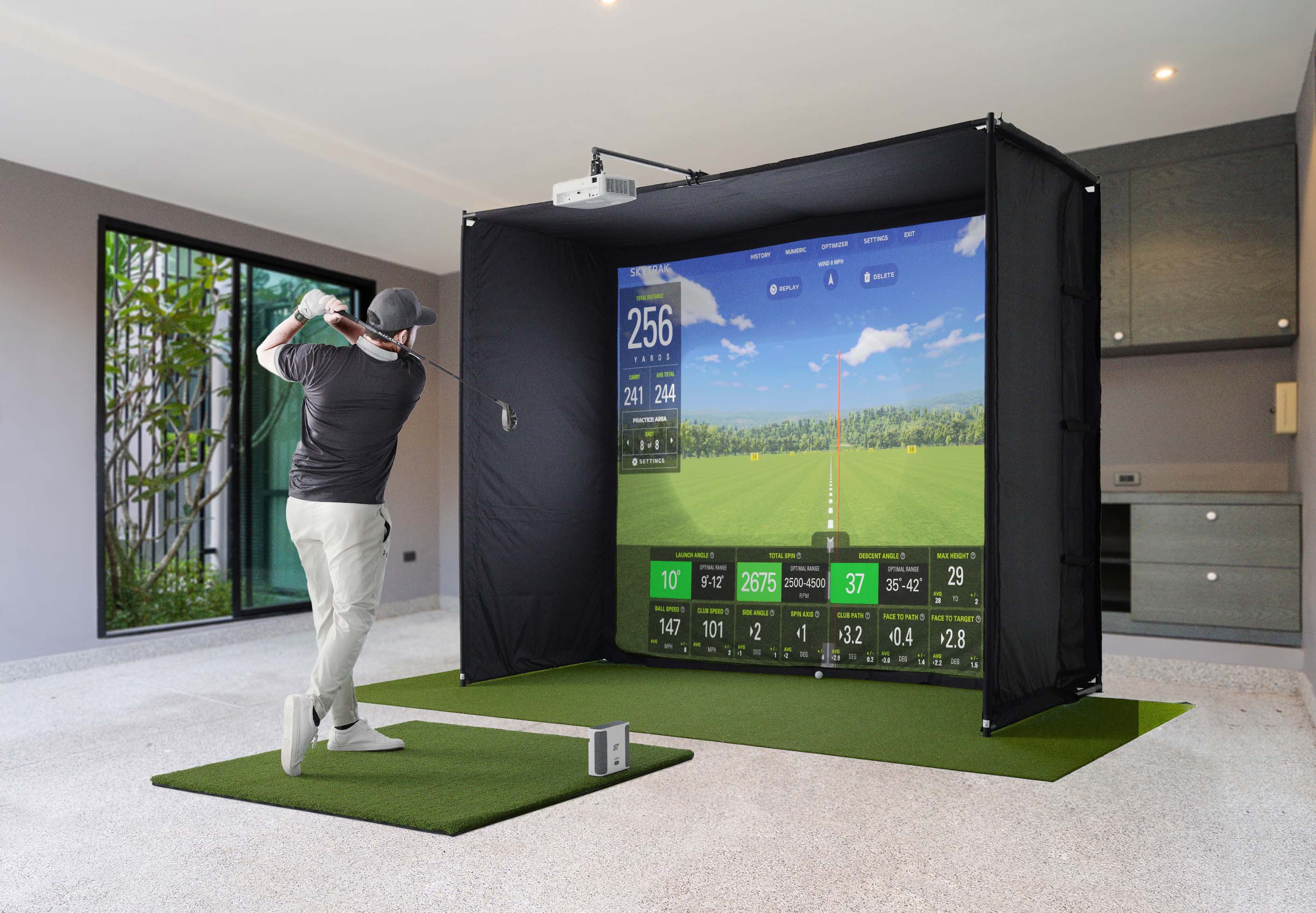
If you’re trying to take full swings in your garage (or anywhere else indoors), 10 feet is the magic ceiling-height number. That’s the height that gives most golfers the freedom to swing confidently with a driver without fear of hitting anything but the golf ball.
That said, plenty of golfers make 9 feet work. And in some cases, you can get away with 8.5 feet. But these tighter clearances only work if you’re a shorter player with a more compact swing, or if you’re willing to limit your club selection.
Keep this in mind: The highest point of your backswing and the peak of your follow-through can stretch higher than you think. Most players need at least 6 to 12 inches of clearance above the highest part of their swing arc to avoid altering their motion.
A ceiling that’s too low can force compensations like flattened planes, shorter swings, or tension in your takeaway. In other words, it defeats the purpose of practicing at home.
PlayBetter is famous as a one-stop shop for whatever type of golf simulator enclosure you might be considering for your setup. But just understand, whether you’re choosing one of our PlayBetter SimStudios or a Carl’s Place enclosure, all of them require a minimum of 8 feet of ceiling height.
You’re not going to swing your golf club inside the enclosure itself. But that helps you see that even to install an enclosure, you need ceilings of at least 8 feet. And the enclosure sizes go up from there. So, once again, think of 10 feet as the magic number.
Check out our full collection of simulator studio packages for all spaces.
Things to Consider for Your Garage Golf Simulator Setup
Ceiling height and overall space considerations affect almost every part of your simulator setup. From how freely you can swing to how you mount your projector, here are the key considerations to make sure your garage space is truly sim-ready:
Swing Room
- How tall are you? How tall are the golfers you’ll be playing with?
- You’ll want at least 6 to 12 inches of clearance above the highest point of your swing.
- If you’re uneasy about hitting the ceiling, it can affect your swing, even if the clearance technically works.
Room Dimensions
- Beyond height, you’ll need the right width and depth. Each launch monitor has its own space requirements, and we’ll break those down below.
- The size of your simulator enclosure and projector mount will all factor in.
- Projector placement matters. Mount it high enough to stay out of your swing path and avoid casting shadows.
Righty vs. Lefty Considerations
- If both right- and left-handed players will be using your sim, some launch monitors will be more accommodating than others.
- Camera-based monitors sit off to the side and need to be repositioned for lefties. Radar and overhead systems tend to be more flexible.
Permanent vs. Retractable
- Will your sim be a full-time setup, or do you need to reclaim the garage for cars or kids? We’ll cover a really cool retractable option that will disappear when not in use. You gotta check this thing out.
Now, let’s take a look at some of the best launch monitors for your garage golf simulator studio, including how much space you’ll need to use each one effectively.
Ceiling Height and Space Requirements for a Garmin Approach R50 Golf Simulator
The Garmin Approach R50 might just be the most innovative golf simulator ever created, and it also happens to be one of the best suited for garage use.

Let’s start with space. Because the R50 is a camera-based launch monitor, it sits just to the side of the hitting area rather than behind it. That means you don’t need the deep room length required by radar systems. If you’ve got 10 feet of ceiling height, you’re golden. Many golfers make it work with 9 feet, and some even squeeze it into 8.5 feet, especially if you’re on the shorter side or sticking to irons and wedges.
In terms of total simulator footprint, you’ll want a space that’s at least 10 feet wide and 10 feet deep. But compared to other setups, the R50’s optical tracking gives you a major space-saving edge indoors.
Where the R50 excels for garage use is in its simplicity. It’s the first fully self-contained launch monitor and simulator, with a beautiful 10-inch color touchscreen built right into the unit. No need to connect to a laptop, tablet, or phone. No need for WiFi. No waiting for sync. Just turn it on, and you’re on the first tee in under a minute.
And if you want a larger visual experience, it connects directly to a projector or TV with a single HDMI cable. That means your whole simulator setup could be nothing more than the R50, a hitting mat, and a net. It doesn’t get more garage-friendly than that.
For the golfer who wants big tech in a compact, clean space, the Garmin R50 is a smart, modern answer.
Check out all of the cool ways you can pair an R50 with a simulator studio enclosure.
Ceiling Height and Space Requirements for a Square Golf Launch Monitor

The Square Golf Launch Monitor is one of the most garage-friendly simulators ever built. It’s compact, affordable, surprisingly accurate, and it runs on camera-based photometric tracking, which is great news for tight indoor spaces. And all for only $700.
Let’s talk space. Because the Square sits beside your hitting zone instead of behind it, you don’t need the long room depth required by radar systems. And since you’re indoors (the Square doesn’t work outdoors), everything about its footprint is built for smaller environments.
Just like with all launch monitors, 10-foot ceilings are ideal, though you might be able to get away with 9 feet or even 8.5. And like with the R50, you’ll want at least 10 feet of width and 10 feet of depth. Like with every setup, the key is making sure you can swing freely without tension.
There’s one more feature that makes the Square uniquely suited for even the tightest garage or home spaces: the Swing Stick. This lightweight training aid lets you simulate shots without hitting a ball at all. It’s not a replacement for real swings, but it’s a smart solution when you need a quiet, clean, minimal-footprint session.
When it comes to building a simulator studio around your Square, you’ve got choices.
Ceiling Height and Space Requirements for a Rapsodo MLM2PRO Garage Golf Simulator

For the right user, the Rapsodo MLM2PRO was already the best sub-$1,000 launch monitor on the market. And now, with the addition of Club Path and Angle of Attack metrics, it’s delivering unbelievable value at its $700 price point.
But to get the most of it indoors, you’ll need space — especially depth. You’ll want the MLM2PRO positioned about 8 feet behind the ball, with at least 13 feet in front to accurately track spin and ball flight. Width-wise, 10 feet is recommended, and ceiling height is the same ideal 10 feet.
The upside of the MLM2PRO is its versatility. It works great for both right- and left-handed players without having to reposition anything. And now that it’s measuring (not guessing) key club metrics like path and attack angle, you’re getting game-improving feedback that used to require a five-figure setup.
Bottom line: If you’ve got the room, the MLM2PRO is an incredible value that’s only getting better.
Find the right simulator studio package to work with your MLM2PRO.
Ceiling Height and Space Requirements for a SkyTrak+ Garage Golf Setup

The SkyTrak+ is another one of those golf simulators where you don’t need a monster room to get a monster experience.
This side-mounted photometric-radar hybrid launch monitor is among the most space-efficient options on the market, making it perfect for a tight garage setup. With as little as 10 feet of room depth, 10 feet of room width, and 10-foot high ceilings (though you may be able to get away with less), you can be in business.
Another sneaky advantage for this launch monitor is that you don’t need special balls or club stickers to get really accurate data. But the real show-stopper is the app experience and all of the simulator fun this launch monitor unlocks.
If you’ve got decent garage ceilings and want a data-rich, fully immersive golf sim experience, without having to remortgage the house, the SkyTrak+ is an outstanding option.
Create a studio package to go with your SkyTrak+.
Ceiling Height and Space Requirements for a Uneekor Eye Mini Lite Golf Simulator

If you’re building a sim-first golf setup with no outdoor range aspirations, the Uneekor Eye Mini Lite might be the best value in the game.
This is a unit with no battery, no screen, and no pretense of portability. And that’s exactly what makes it shine. The Eye Mini Lite is a purpose-built, premium indoor solution for golfers who care deeply about data accuracy and sim immersion but who want to avoid spending for features they don’t plan to use.
Like other camera-based systems, the Eye Mini Lite doesn’t need a ton of room behind or in front of the ball. It tracks from the side, which means it’s a great fit for garages, basements, or any room where ceiling height is 9 feet or more. You’ll want 10 feet of width and 10 feet of depth as a baseline, though tighter setups may still work depending on your height and swing.
What really sets the Eye Mini Lite apart isn’t just that it fits well in modest spaces, it’s that it feels like a tour-level tool. You get 19 data points (ball and club), instant readouts, and Uneekor’s slick software suite, including a three-month trial of their new 4K-ready GameDay simulator software.
If you’re cool with a wired connection and a PC-only ecosystem, the Uneekor Eye Mini Lite is a great way to keep your launch monitor spend under $3,000. And that gives you more wiggle room to build a dream setup around it. As you might expect, there are a lot of options.
Ceiling Height and Space Requirements for a Foresight Sports GC3 Golf Simulator in Your Garage

With the Foresight GC3, you’ve got options. You can pay everything up front and never have to worry about a subscription ever again with the standard GC3. Or you can opt to save some money initially and then pay $499 annually with the subscription-based GC3S.
In either case you’re getting a tried-and-true, three-camera launch monitor that is capable of delivering the most accurate ball and club data of any launch monitor anywhere near its price point. This thing is a proven winner. If you want a choice that you’ll never have to second guess, this is the way to go. Plus, you get access to all of the incredibly immersive Foresight simulated golf courses.
As for ceiling height and space requirements, it’s exactly the same as with any photometric, side-sitting launch monitor. Meaning 10 feet of ceiling height would be nice, but you can possibly get away with 9, and room width and depth should ideally be around 10 feet.
Check out all these great options for pairing a GC3 or GC3S with a simulator studio setup.
Ceiling Height and Space Requirements for a Foresight Sports Falcon Golf Simulator

Dreaming of a garage sim setup that feels like it belongs in a Tour pro’s training facility? The overhead-mounted Foresight Falcon brings that dream closer to reality, assuming your space is big enough to handle it.
The good news is that you really don’t need any more ceiling height for this overhead mount (10 feet would be ideal) than with a different type of launch monitor. You’ll want 10 feet of width and 14 feet of total depth and the ability to mount the Falcon 4 feet in front of your hitting zone.
If you can clear those hurdles, the payoff is huge. And the beauty of an overhead mount is that once it’s set, it’s entirely out of the way. No worrying about moving the launch monitor in and out of your space as your golf simulator shares the garage with other uses.
If you’ve got the space, the Falcon offers the cleanest, most professional indoor golf simulator experience you can install.
Take a look at your options for pairing this beauty with an enclosure.
The Vanish Series Retractable Golf Enclosure: A Game-Changer for Garage Sim Setups

Not every golfer has the luxury of dedicating a full-time space to their indoor golf simulator. And that’s exactly why the SportScreen Vanish Series has become such a breakthrough.
This is not a compromise. It’s a smart, premium solution for anyone building their sim in a multi-use space, especially a garage that still needs to, you know, function as a garage.
Here’s the magic: When you’re ready to play, the Vanish Series unrolls from the ceiling to deliver a fully enclosed golf simulator studio. Blackout side panels. Ceiling protection. High-quality, three-ply impact screen. The whole thing looks and feels like a fixed premium setup.
But when it’s time to park the car or let the kids run wild, the Vanish enclosure retracts back to the ceiling, leaving your space completely open and uncluttered. Choose from manual or motorized versions (yep, there’s even Alexa and Google Home compatibility), and go from “golf mode” to “garage mode” in under a minute.
So if you’ve been holding off on building your dream garage golf sim because of space limitations, this might be your moment. The Vanish Series makes it not only possible. It makes it beautiful.
Got Questions? Give Us a Call!
We know that there’s a lot that goes into building a golf simulator studio. And ceiling height and space requirements are only two of the components. That’s why our experts are available to help you make your best decisions.
You can also learn a lot via our online resources. We’ve reviewed just about every golf simulator available, and you can have a lot of fun visiting our studio simulator packages to envision what might work for your space.
So, take your time, do your research, and let us know how we can help you. We’re ready when you are!
About PlayBetter Golf Reviewer Marc Sheforgen
Marc "Shef" Sheforgen is a golf writer whose passion for the game far exceeds his ability to play it well. Marc covers all things golf, from product reviews and equipment recommendations to event coverage and tournament analysis. When he’s not playing, watching, or writing about golf, he enjoys traveling (often golf-related), youth sports coaching, volunteering, and record collecting.